Grounding Your Salesforce Agent With Real-World Data (RAG, Chunking, Data Library & More!)
If Part 1 was about understanding what Agentforce is, Part 2 is all about understanding how your agent becomes smart, trustworthy, and actually useful in the real world.
And the secret is Grounding.
(Yes, the dramatic capital G is intentional 😄)
Let’s dive in.
🌍 What Is Grounding? (And Why Your Agent Needs It)
Grounding = connecting your AI agent to trusted, authoritative data so it answers based on facts — not imagination.
When you ask an agent a question like:
“What is the refund policy for our subscription product?”
It shouldn’t hallucinate. It should look at:
- Your internal Knowledge Articles
- Your Pricing policies
- Your Product documentation
- Your CRM records
- Your Product database, etc.
That is grounding.
It tells the LLM:
👉 “Use THIS data only. Stay within THIS reality.”
The Building Blocks of an Agent
Even a perfectly grounded agent needs the right internal structure. Salesforce defines three essential elements that make up an agent:
1. Topics
Define what the agent is responsible for
Example: “Refund Requests”, “Appointment Scheduling”, “Order Status”
2. Instructions
Tell the agent how to behave, what to avoid, and what rules to follow
Example: “Always verify customer identity before sharing account details.”
3. Actions
Specific things the agent can perform
Examples:
- Create a Case
- Update an Order
- Fetch Customer Details
⭐ Connect Actions to Data with Four Mechanisms
Grounding isn’t just about finding the right information — your agent must also know how to use that information when performing real actions.
In Agentforce, this connection happens through four powerful data-access mechanisms. Each mechanism tells the agent where the data lives and how it should be retrieved or modified.
These mechanisms act like different “doors” through which the agent can reach your business data, depending on what the task requires.
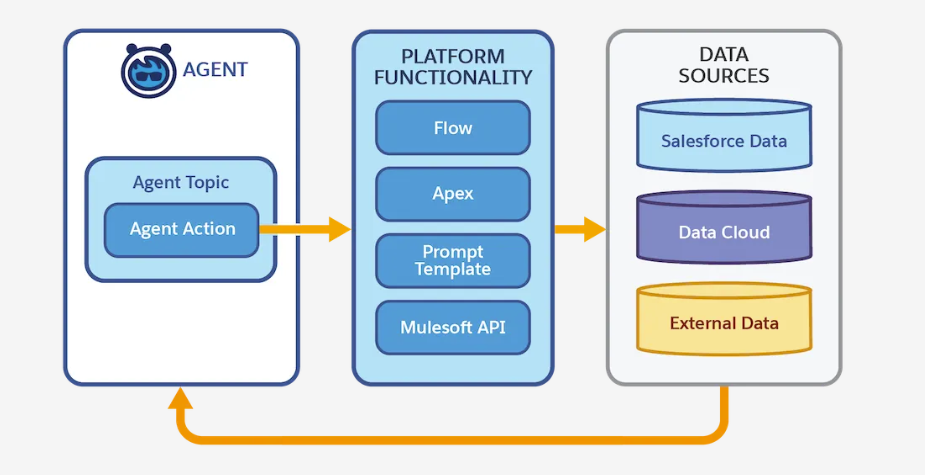
1️⃣ Grounded Actions — When your data is stored natively in Salesforce
Use Grounded Actions when the agent needs to work directly with Salesforce data you already trust — such as:
- Accounts
- Contacts
- Leads
- Cases
- Opportunities
- Custom objects
Grounded Actions allow the agent to read and write this data safely, using the platform’s built-in permissions and security model.
Perfect for CRM-centric tasks like:
- “Update the case priority.”
- “Create a follow-up task.”
- “Find all opportunities closing this month.”
Because the agent uses real Salesforce objects, its decisions stay grounded in accurate, structured information.
2️⃣ Data Graph — When you need connected, contextual information
Sometimes data lives across many related objects. That’s where the Data Graph comes in.
A Data Graph gives your agent a relationship-aware view of your Salesforce data. You define a “graph” of objects and their connections — for example:
- Customer → Orders → Order Line Items → Products
Your agent can then reason across the entire graph as a single interconnected dataset.
Useful for:
- Customer 360 tasks
- Order history analyses
- Eligibility checks
- Product recommendations
The Data Graph works best when decisions depend on multiple objects connected through relationships.
3️⃣ Actions on CRM and External Systems — When data lives beyond Salesforce
Businesses don’t live in one system, and neither should your agent.
This mechanism allows your Agentforce agent to interact with:
- External APIs
- Integration platforms
- Back-office applications
- Custom REST endpoints
Examples:
- Fetching shipment tracking from a logistics system
- Pulling credit score from a partner API
- Checking inventory in a warehouse system
This expands your agent’s capabilities far beyond CRM and ensures it has access to real-time operational data, even if it lives outside Salesforce.
4️⃣RAG: The Heart of Grounding
Retrieval-Augmented Generation (RAG) means the agent:
- Receives a user query
- Retrieves relevant, real-world data
- Uses that data to generate grounded, factual output
LLMs don’t know your business.
RAG lets them pull knowledge from YOUR data before generating an answer.
Structured vs. Unstructured Data in RAG
RAG can ground using both types of data:
1️⃣ Structured Data
Highly organized. Searchable by fields.
Examples:
- Salesforce Objects (Lead, Case, Product, Contract)
- Database tables
- CSVs
Great for:
✔ precise lookups
✔ numerical or identifier-based queries
Example:
“What is the warranty period for product XYZ123?”
A simple CRM lookup might be enough.
2️⃣ Unstructured Data
Humans love writing. Machines don’t love parsing it.
Examples:
- PDFs
- Policy documents
- Web pages
- Meeting transcripts
- User manuals
- Knowledge articles
This is where LLMs shine — but only if you help them access the right parts.
3️⃣ Semi-Structured
A mix.
Examples:
- JSON
- XML
- Chat logs
- Formatted docs
🔥Most organizations have tons of unstructured content lying around — but it’s rich with answers. RAG makes unstructured data searchable, relevant, and safe to use inside an AI workflow.
📚 Introducing Agentforce Data Library
(Where Chunking, Indexing & Retrieval Live)
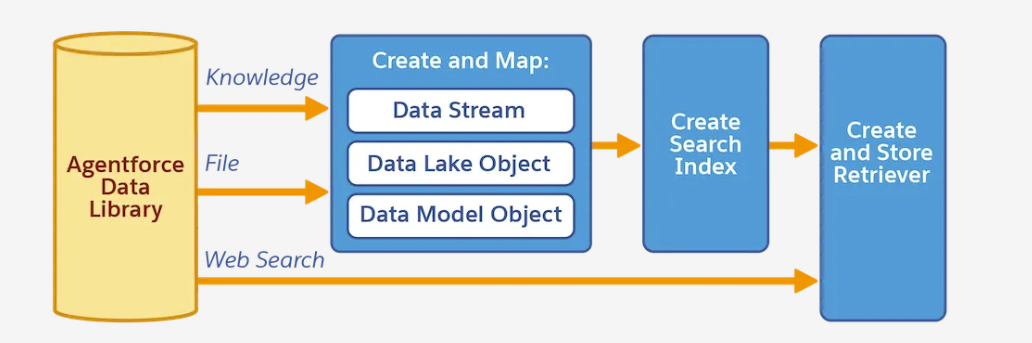
Agentforce uses the Agentforce Data Library (ADL) to ingest, transform, index, and prepare your data for retrieval.
Think of ADL as the “data brain” behind your agent.
🔨 How Data Library Works (The Real Magic)
Let’s break it down into digestible steps.
🧩 1. Chunking — Breaking Large Content Into Smart Pieces
LLMs can’t read a 40-page PDF and decide which part is relevant.
So ADL automatically chops your documents into smaller, meaningful “chunks.”
Example:
- A 20-page Refund Policy PDF → 200 chunks
- A product manual → 100 chunks
Each chunk becomes a small searchable unit.
👉 This makes retrieval fast, accurate, and context-rich.
🗂 2. Indexing — Creating a High-Speed Search Layer
After chunking, ADL builds a vector index.
In simple terms:
- Each chunk becomes an embedding (mathematical representation of meaning)
- These embeddings are placed in an index
- When the agent gets a question, it finds the most similar chunks
This is the backbone of RAG.
🧭 3. Retriever — The Engine That Finds Relevant Chunks
The retriever is what actually searches the index.
When a user asks:
👉 “What are the cancellation rules for Enterprise Customers?”
The retriever fetches:
- Enterprise contract policies
- SLA docs
- Pricing schedules
- Relevant knowledge articles
These chunks are sent to the LLM along with the prompt template.

⚙️ 4. Setup-Time vs Run-Time — What Happens When?
Setup-Time (When You Configure ADL):
✔ You add data sources (files, knowledge articles, objects)
✔ ADL creates a Data Stream
✔ Chunking happens
✔ Indexing happens
✔ Retriever is prepared
✔ Metadata + mappings are generated
✔ You reference the retriever in your agent’s design
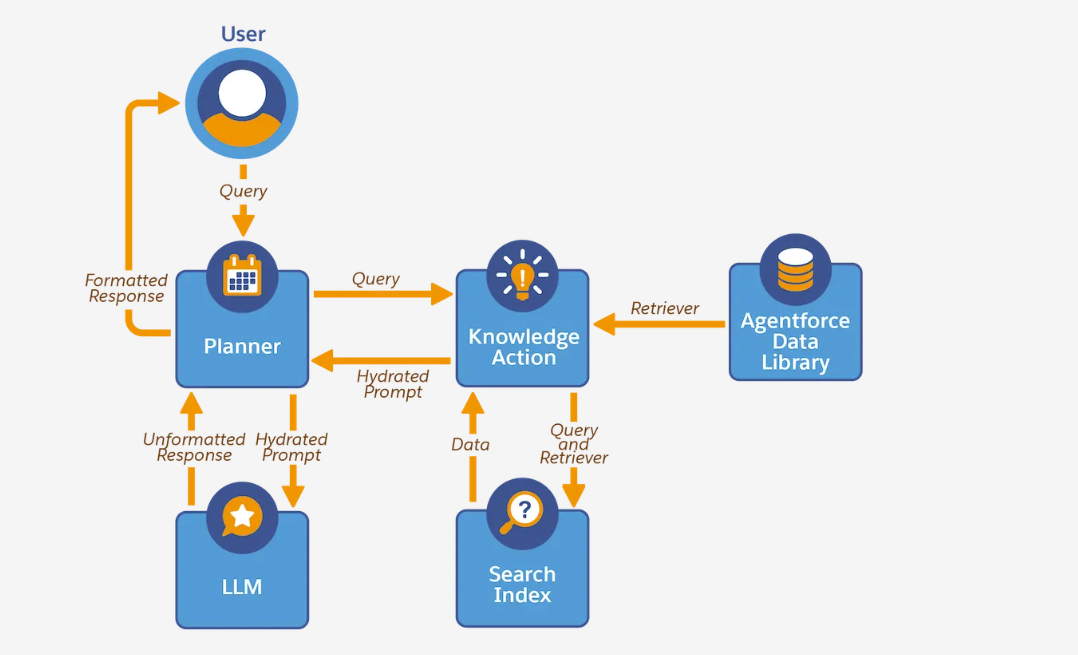
Run-Time (When the Agent Is Live):
- User asks a question
- Retriever searches the index
- Most relevant chunks are selected
- Prompt template is filled with these chunks
- LLM generates grounded response
- Agent returns accurate, policy-compliant output
🧪 A Practical Example — Making a “Refund & Warranty Support Agent”
Imagine you upload:
- 3 Warranty policy PDFs
- 50 Knowledge articles
- A troubleshooting guide
- A CSV of product models
ADL will:
🟦 Chunk PDFs → 700 chunks
🟦 Chunk support documents → 300 chunks
🟦 Create embedding index
🟦 Build retriever
🟦 Allow agent to pull relevant blocks at runtime
Then your agent can answer:
💬 “What’s the refund window for Model Z?”
💬 “Do premium users get extended warranty?”
💬 “Can I return a product without invoice?”
With incredible accuracy — because it uses YOUR content.
 Jyoti Agarwal