Category: Uncategorized

  • 🚀 AgentForce Series — Part 2:


    Grounding Your Salesforce Agent With Real-World Data (RAG, Chunking, Data Library & More!)

    If Part 1 was about understanding what Agentforce is, Part 2 is all about understanding how your agent becomes smart, trustworthy, and actually useful in the real world.

    And the secret is Grounding.
    (Yes, the dramatic capital G is intentional 😄)

    Let’s dive in.


    🌍 What Is Grounding? (And Why Your Agent Needs It)

    Grounding = connecting your AI agent to trusted, authoritative data so it answers based on facts — not imagination.

    When you ask an agent a question like:

    “What is the refund policy for our subscription product?”

    It shouldn’t hallucinate. It should look at:

    • Your internal Knowledge Articles
    • Your Pricing policies
    • Your Product documentation
    • Your CRM records
    • Your Product database, etc.

    That is grounding.

    It tells the LLM:
     👉 “Use THIS data only. Stay within THIS reality.”

    The Building Blocks of an Agent

    Even a perfectly grounded agent needs the right internal structure. Salesforce defines three essential elements that make up an agent:

    1. Topics

    Define what the agent is responsible for
     Example: “Refund Requests”, “Appointment Scheduling”, “Order Status”

    2. Instructions

    Tell the agent how to behave, what to avoid, and what rules to follow
     Example: “Always verify customer identity before sharing account details.”

    3. Actions

    Specific things the agent can perform
     Examples:

    • Create a Case
    • Update an Order
    • Fetch Customer Details

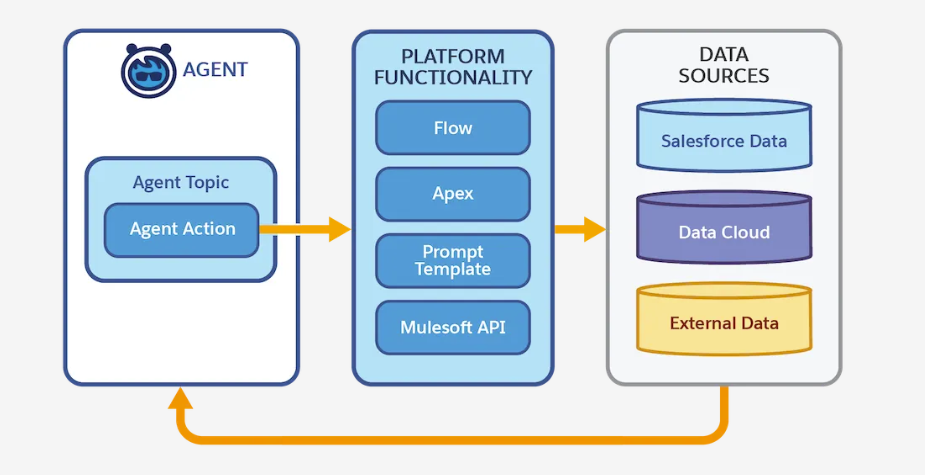
    ⭐ Connect Actions to Data with Four Mechanisms

    Grounding isn’t just about finding the right information — your agent must also know how to use that information when performing real actions.
     In Agentforce, this connection happens through four powerful data-access mechanisms. Each mechanism tells the agent where the data lives and how it should be retrieved or modified.

    These mechanisms act like different “doors” through which the agent can reach your business data, depending on what the task requires.

    1️⃣ Grounded Actions — When your data is stored natively in Salesforce

    Use Grounded Actions when the agent needs to work directly with Salesforce data you already trust — such as:

    • Accounts
    • Contacts
    • Leads
    • Cases
    • Opportunities
    • Custom objects

    Grounded Actions allow the agent to read and write this data safely, using the platform’s built-in permissions and security model.
     Perfect for CRM-centric tasks like:

    • “Update the case priority.”
    • “Create a follow-up task.”
    • “Find all opportunities closing this month.”

    Because the agent uses real Salesforce objects, its decisions stay grounded in accurate, structured information.


    2️⃣ Data Graph — When you need connected, contextual information

    Sometimes data lives across many related objects. That’s where the Data Graph comes in.

    A Data Graph gives your agent a relationship-aware view of your Salesforce data. You define a “graph” of objects and their connections — for example:

    • Customer → Orders → Order Line Items → Products

    Your agent can then reason across the entire graph as a single interconnected dataset.

    Useful for:

    • Customer 360 tasks
    • Order history analyses
    • Eligibility checks
    • Product recommendations

    The Data Graph works best when decisions depend on multiple objects connected through relationships.


    3️⃣ Actions on CRM and External Systems — When data lives beyond Salesforce

    Businesses don’t live in one system, and neither should your agent.

    This mechanism allows your Agentforce agent to interact with:

    • External APIs
    • Integration platforms
    • Back-office applications
    • Custom REST endpoints

    Examples:

    • Fetching shipment tracking from a logistics system
    • Pulling credit score from a partner API
    • Checking inventory in a warehouse system

    This expands your agent’s capabilities far beyond CRM and ensures it has access to real-time operational data, even if it lives outside Salesforce.


    4️⃣RAG: The Heart of Grounding

    Retrieval-Augmented Generation (RAG) means the agent:

    1. Receives a user query
    2. Retrieves relevant, real-world data
    3. Uses that data to generate grounded, factual output

    LLMs don’t know your business.
    RAG lets them pull knowledge from YOUR data before generating an answer.

    Structured vs. Unstructured Data in RAG

    RAG can ground using both types of data:

    1️⃣ Structured Data

    Highly organized. Searchable by fields.
     Examples:

    • Salesforce Objects (Lead, Case, Product, Contract)
    • Database tables
    • CSVs

    Great for:
     ✔ precise lookups
     ✔ numerical or identifier-based queries

    Example:

    “What is the warranty period for product XYZ123?”

    A simple CRM lookup might be enough.


    2️⃣ Unstructured Data

    Humans love writing. Machines don’t love parsing it.
     Examples:

    • PDFs
    • Policy documents
    • Web pages
    • Meeting transcripts
    • User manuals
    • Knowledge articles

    This is where LLMs shine — but only if you help them access the right parts.


    3️⃣ Semi-Structured

    A mix.
    Examples:

    • JSON
    • XML
    • Chat logs
    • Formatted docs

    🔥Most organizations have tons of unstructured content lying around — but it’s rich with answers. RAG makes unstructured data searchable, relevant, and safe to use inside an AI workflow.


    📚 Introducing Agentforce Data Library

    (Where Chunking, Indexing & Retrieval Live)

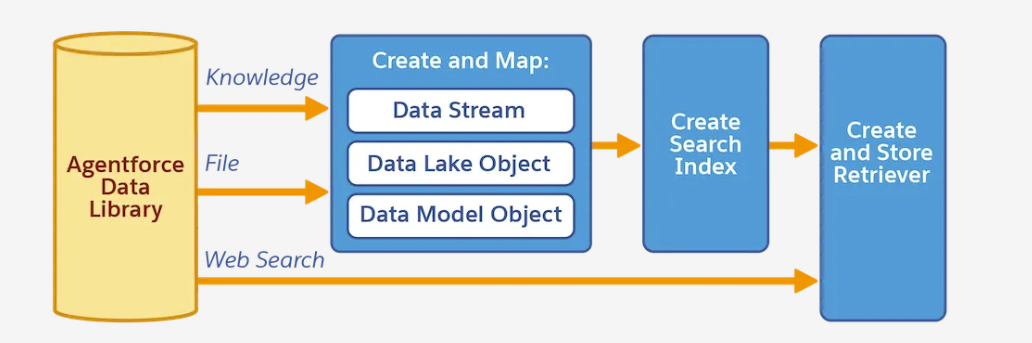
    Agentforce uses the Agentforce Data Library (ADL) to ingest, transform, index, and prepare your data for retrieval.

    Think of ADL as the “data brain” behind your agent.


    🔨 How Data Library Works (The Real Magic)

    Let’s break it down into digestible steps.

    🧩 1. Chunking — Breaking Large Content Into Smart Pieces

    LLMs can’t read a 40-page PDF and decide which part is relevant.
     So ADL automatically chops your documents into smaller, meaningful “chunks.”

    Example:

    • A 20-page Refund Policy PDF → 200 chunks
    • A product manual → 100 chunks

    Each chunk becomes a small searchable unit.

    👉 This makes retrieval fast, accurate, and context-rich.


    🗂 2. Indexing — Creating a High-Speed Search Layer

    After chunking, ADL builds a vector index.

    In simple terms:

    • Each chunk becomes an embedding (mathematical representation of meaning)
    • These embeddings are placed in an index
    • When the agent gets a question, it finds the most similar chunks

    This is the backbone of RAG.


    🧭 3. Retriever — The Engine That Finds Relevant Chunks

    The retriever is what actually searches the index.

    When a user asks:
     👉 “What are the cancellation rules for Enterprise Customers?”

    The retriever fetches:

    • Enterprise contract policies
    • SLA docs
    • Pricing schedules
    • Relevant knowledge articles

    These chunks are sent to the LLM along with the prompt template.


    ⚙️ 4. Setup-Time vs Run-Time — What Happens When?

    Setup-Time (When You Configure ADL):

    ✔ You add data sources (files, knowledge articles, objects)
     ✔ ADL creates a Data Stream
     ✔ Chunking happens
     ✔ Indexing happens
     ✔ Retriever is prepared
     ✔ Metadata + mappings are generated
     ✔ You reference the retriever in your agent’s design

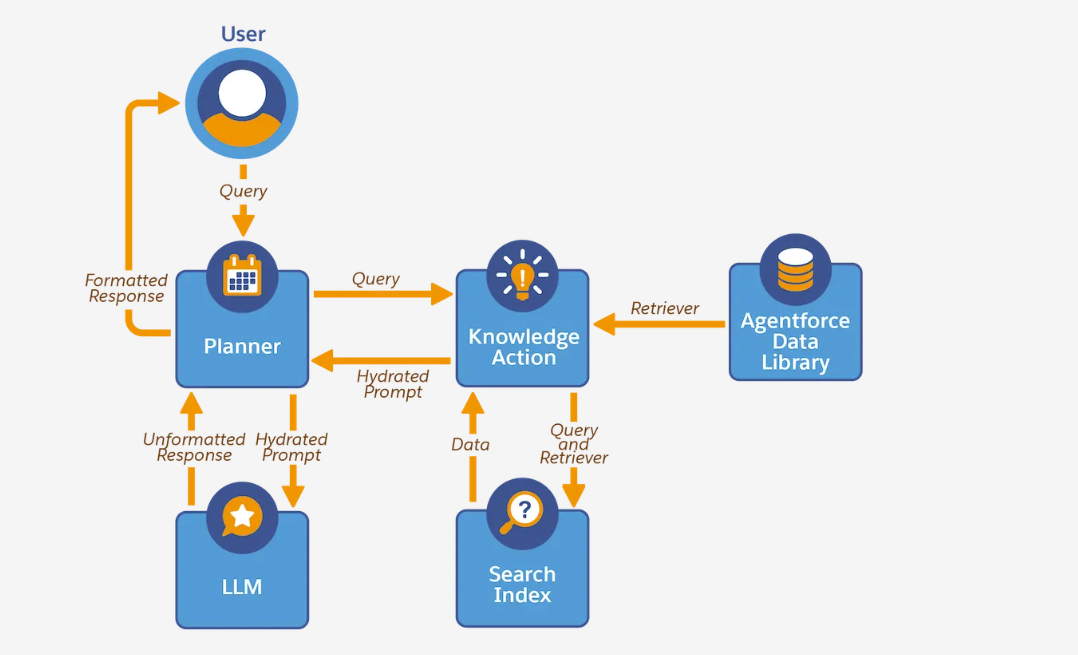
    Run-Time (When the Agent Is Live):

    1. User asks a question
    2. Retriever searches the index
    3. Most relevant chunks are selected
    4. Prompt template is filled with these chunks
    5. LLM generates grounded response
    6. Agent returns accurate, policy-compliant output

    🧪 A Practical Example — Making a “Refund & Warranty Support Agent”

    Imagine you upload:

    • 3 Warranty policy PDFs
    • 50 Knowledge articles
    • A troubleshooting guide
    • A CSV of product models

    ADL will:
     🟦 Chunk PDFs → 700 chunks
     🟦 Chunk support documents → 300 chunks
     🟦 Create embedding index
     🟦 Build retriever
     🟦 Allow agent to pull relevant blocks at runtime

    Then your agent can answer:
     💬 “What’s the refund window for Model Z?”
     💬 “Do premium users get extended warranty?”
     💬 “Can I return a product without invoice?”

    With incredible accuracy — because it uses YOUR content.

  • 🚀 Agentic AI Series — Part 1:


    Demystifying Salesforce’s Agentic AI: Copilot, Prompt Builder & Agentforce Explained

    AI isn’t just “nice to have” anymore — it’s becoming the engine behind faster decision-making, smoother workflows, and smarter experiences. And at the heart of Salesforce’s AI evolution lies its Agentic AI framework: Einstein Copilot, Prompt Builder, and Agentforce.

    This article kicks off my new series on Agentic AI 🤖✨ where I break down concepts, real-world use cases, best practices, and hands-on tutorials.

    Welcome to Part 1!


    🌟 What Is Agentic AI?

    In simple terms, Agentic AI means AI that not only answers questions but takes actions.
    It doesn’t just respond — it executes, decides, and automates, based on natural language instructions.

    Salesforce brings this to life with:

    🧠 Einstein Copilot

    A conversational AI assistant that lives inside Salesforce and can:

    • Generate responses
    • Summarize
    • Draft content
    • Pull Salesforce data via grounded reasoning
    • Execute actions using skills

    🧱 Prompt Builder

    Configure grounded prompts, connect them with data using Prompt Templates, and test outputs — the bridge between natural language and structured Salesforce logic.

    🤝 Agentforce (AI Agents)

    These are autonomous, multi-step agents that can:

    • Follow workflows
    • Trigger automations
    • Make decisions
    • Interact with external systems
    • Execute tasks end-to-end

    Basically:
    Copilot = interactive assistant
    Agentforce = autonomous worker


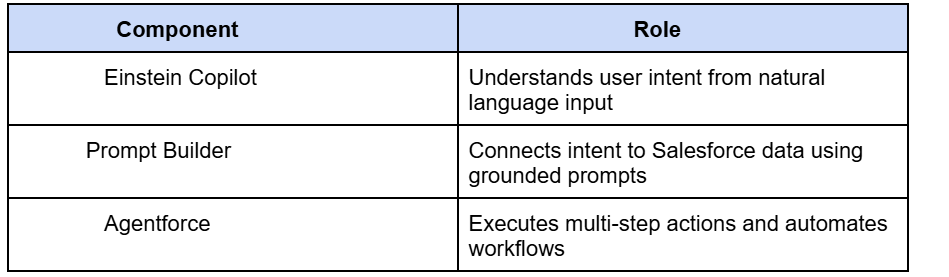
    🧩 How They Work Together

    Think of this trio as a mini workforce inside Salesforce:

    Together, they create agentic workflows that remove manual effort and keep humans focused on higher-level thinking. 💡


    🚦 Types of Salesforce AI Agents

    According to Salesforce docs, Agentforce supports different agent types based on use case:

    1️⃣ Retrieval Agents

    Great for search, recommendations, or knowledge lookups.

    2️⃣ Reasoning Agents

    Break down steps, plan actions, and decide what to do next.
     (Think of them as the “brains” 🧠)

    3️⃣ Action Agents

    They do things — create records, update data, trigger flows.

    4️⃣ Hybrid Agents

    Combine retrieval + reasoning + action for multi-step workflows.

    In upcoming parts of the series, I’ll build examples like:

    💬 “Generate a proposal” → lookup → calculate → draft → update Opportunity → email → log activity
     All agentically done!


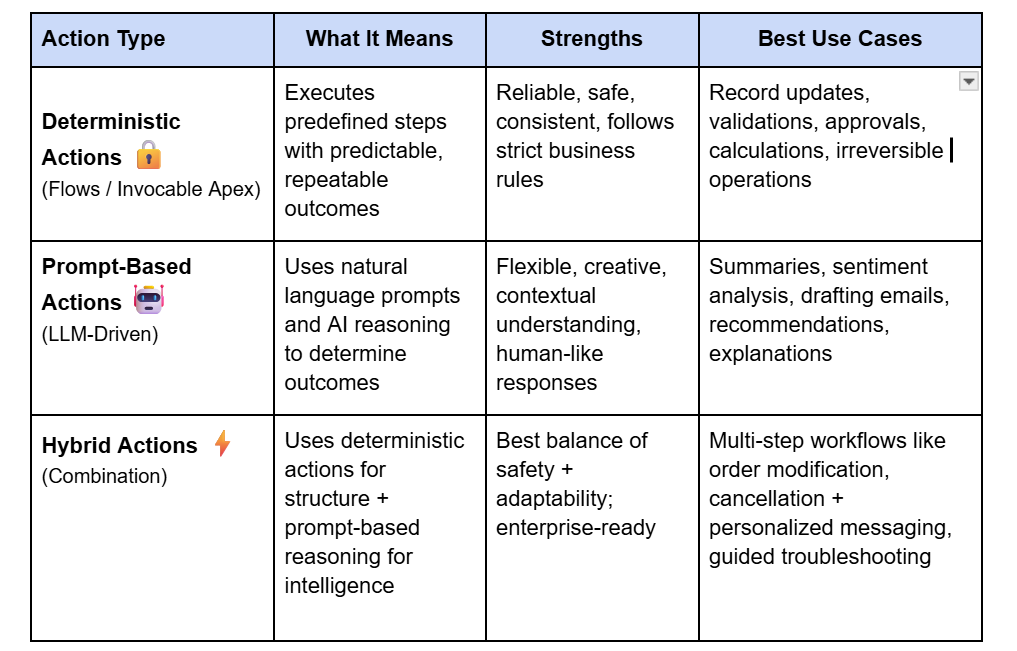
    🧭 Deterministic vs Prompt-Based Actions — A Key Design Choice in Agentic AI

    As you start building agents, one of the most important architectural decisions you’ll make is choosing between deterministic and prompt-based actions. Salesforce highlights this in the Prototype the Agent Trailhead module, and it’s a foundational part of designing safe, reliable AI systems.

    In most real-world solutions, the best approach is hybrid:

    • Use deterministic actions for high-impact business logic.
    • Use prompt-based reasoning for contextual understanding, conversation, and content generation.

    For example:

    “Cancel my subscription”
     → Deterministic flow handles cancellation
     → Prompt-based action generates an empathetic message:
     
    “We’re sorry to see you go — could you share what didn’t work?”

    This balance keeps the agent safe, smart, and human-like — all at once.

    I’ll dive deeper into this in the upcoming articles of this series, where we’ll prototype an actual agent step-by-step. 🚀

    🧪 Why Salesforce’s Agentic AI Matters

    ✔ Eliminates repetitive tasks
     ✔ Makes CRM processes 10× faster
     ✔ Reduces human errors
     ✔ Gives business teams autonomy without developer dependency
     ✔ Allows developers to scale impact with AI-first architectures

    And the best part?
    It’s all native, secure, and trust-layer protected 🔒.


    📚 What I Used as Sources

    • Salesforce Trailhead: Einstein Copilot Basics
    • Salesforce Docs: Copilot Overview
    • Salesforce Docs: AI Agent Types & Setup

    🎉 Final Thoughts

    Agentic AI isn’t the future — it’s the now.
    If you’re in Salesforce development, architecture, or admin work, this is your moment to embrace the shift.

    This article is Part 1 of my Agentic AI Series.
     Next up:
     👉 Part 2: How to Build Your First Einstein Copilot Prompt (Real Example)


  • Salesforce-to-Salesforce Integration using REST API: Enriching Account Data with Verified Information

    The Context

    In many enterprises, multiple Salesforce orgs coexist with different roles. One org may serve as the system of engagement, while another holds verified, authoritative data.

    Our goal was simple: ensure Org A accounts always had trusted data (such as Company Name, Headquarters, Website, and Industry) by pulling this information from Org B. Instead of users manually checking and updating records, the process had to be automatic, reliable, and scalable.

    The CAPIQ Id was used as the unique identifier to match records across the two orgs.


    The Approach

    1. REST API in Org B (Source Org)

    A REST resource in Org B provided verified account data by CAPIQ Id.

    @RestResource(urlMapping='/verifiedAccounts/*')
    global with sharing class VerifiedAccountsAPI {
        @HttpPost
        global static AccountResponse getAccounts(List<String> capiqIds) {
            List<Account> accounts = [
                SELECT Id, CAPIQ_Id__c, Name, Website, Industry, Headquarters__c
                FROM Account
                WHERE CAPIQ_Id__c IN :capiqIds
            ];
            
            AccountResponse response = new AccountResponse();
            response.accounts = new List<AccountDTO>();
            
            for (Account acc : accounts) {
                response.accounts.add(new AccountDTO(acc));
            }
            return response;
        }
    }
    
    global class AccountDTO {
        public String capiqId;
        public String name;
        public String website;
        public String industry;
        public String headquarters;
        
        public AccountDTO(Account acc) {
            capiqId = acc.CAPIQ_Id__c;
            name = acc.Name;
            website = acc.Website;
            industry = acc.Industry;
            headquarters = acc.Headquarters__c;
        }
    }


    2. Batch Job in Org A (Target Org)

    The batch job in Org A orchestrated the enrichment:

    • New Accounts (created after last run) were picked up.
    • Flagged Accounts (Get_Data_From_External__c) were refreshed on-demand.
    • All Accounts were periodically refreshed every 2 days.
    • Not Found Handling – if no match was found in Org B, the CAPIQ Id was recorded both at the account level (External_Status__c = "Not Found") and centrally in a Custom Setting. These accounts were retried in subsequent scheduled runs.
    • Partial Updates – we used Database.update(records, false) to ensure one failure didn’t stop the whole batch.

    global class AccountDataEnrichmentBatch implements Database.Batchable<SObject>, Database.Stateful {
    
        Set<String> notFoundIds = new Set<String>();
        Integer successCount = 0;
        Integer failureCount = 0;
    
        global Database.QueryLocator start(Database.BatchableContext bc) {
            DateTime lastRun = AccountSyncConfig__c.getOrgDefaults().Last_Run__c;
            return Database.getQueryLocator([
                SELECT Id, CAPIQ_Id__c, Get_Data_From_External__c
                FROM Account
                WHERE LastModifiedDate > :lastRun
                   OR Get_Data_From_External__c = true
            ]);
        }
    
        global void execute(Database.BatchableContext bc, List<Account> accounts) {
            List<String> capiqIds = new List<String>();
            for (Account acc : accounts) {
                if (acc.CAPIQ_Id__c != null) {
                    capiqIds.add(acc.CAPIQ_Id__c);
                }
            }
    
            HttpRequest req = new HttpRequest();
            req.setEndpoint('callout:OrgB/verifiedAccounts');
            req.setMethod('POST');
            req.setBody(JSON.serialize(capiqIds));
            
            Http http = new Http();
            HttpResponse res = http.send(req);
    
            if (res.getStatusCode() == 200) {
                List<AccountDTO> verifiedAccounts =
                    (List<AccountDTO>) JSON.deserialize(res.getBody(), List<AccountDTO>.class);
    
                Map<String, AccountDTO> verifiedMap = new Map<String, AccountDTO>();
                for (AccountDTO dto : verifiedAccounts) {
                    verifiedMap.put(dto.capiqId, dto);
                }
    
                List<Account> toUpdate = new List<Account>();
                for (Account acc : accounts) {
                    if (verifiedMap.containsKey(acc.CAPIQ_Id__c)) {
                       AccountDTO dto = verifiedMap.get(acc.CAPIQ_Id__c);
                        acc.Name = dto.name;
                        acc.Website = dto.website;
                        acc.Industry = dto.industry;
                        acc.Headquarters__c = dto.headquarters;
                        acc.Get_Data_From_External__c = false;
                        acc.External_Status__c = 'Updated';
                        acc.Last_Enriched__c = System.now();
                        toUpdate.add(acc);
                    } else {
                        notFoundIds.add(acc.CAPIQ_Id__c);
                        acc.External_Status__c = 'Not Found';
                    }
                }
    
                // Allow partial updates
                Database.SaveResult[] results = Database.update(toUpdate, false);
    
                for (Database.SaveResult sr : results) {
                    if (sr.isSuccess()) successCount++;
                    else failureCount++;
                }
            }
        }
    
        global void finish(Database.BatchableContext bc) {
            AccountSyncConfig__c cfg = AccountSyncConfig__c.getOrgDefaults();
            cfg.Last_Run__c = System.now();
            cfg.Last_Successful_Updates__c = successCount;
            cfg.Last_Failures__c = failureCount;
            cfg.Not_Found_CAPIQ_Ids__c = String.join(new List<String>(notFoundIds), ',');
            upsert cfg;
        }
    }


    Architectural Flow

    ┌─────────────┐             REST API            ┌─────────────┐
    │   Org A     │  ─────────────────────────────► │   Org B     │
    │ (Target)    │                                 │ (Source)    │
    │  Batch Job  │  ◄───────────────────────────── │  REST API   │
    └─────────────┘          Verified Data          └─────────────┘
           │
           ▼
     Enriched Accounts 
     (Updated, Not Found, Failed statuses + Timestamps)


    Key Highlights

    • Partial UpdatesDatabase.update(..., false) prevented batch failures.
    • Not Found Resilience – unmatched CAPIQ Ids were tracked and re-attempted in the next scheduled run.
    • Transparency – each account had a status (Updated, Not Found, Failed) and timestamp for auditability.
    • Configurable & Future-Proof – Custom Settings controlled field mappings, run stats, and retry logic.

    Final Thoughts

    This integration wasn’t just about moving data — it was about building a trustworthy enrichment pipeline. With verified data pulled automatically, users in Org A no longer had to cross-check or manually update accounts.

    The design ensured:

    • High-quality data (verified from Org B)
    • Resilience (partial updates, retries for not found IDs)
    • Auditability (clear statuses and run stats)
    • Flexibility (easily extendable to more fields or objects)
  • Salesforce-to-Salesforce (S2S): A Simple Way to Share Data Across Orgs

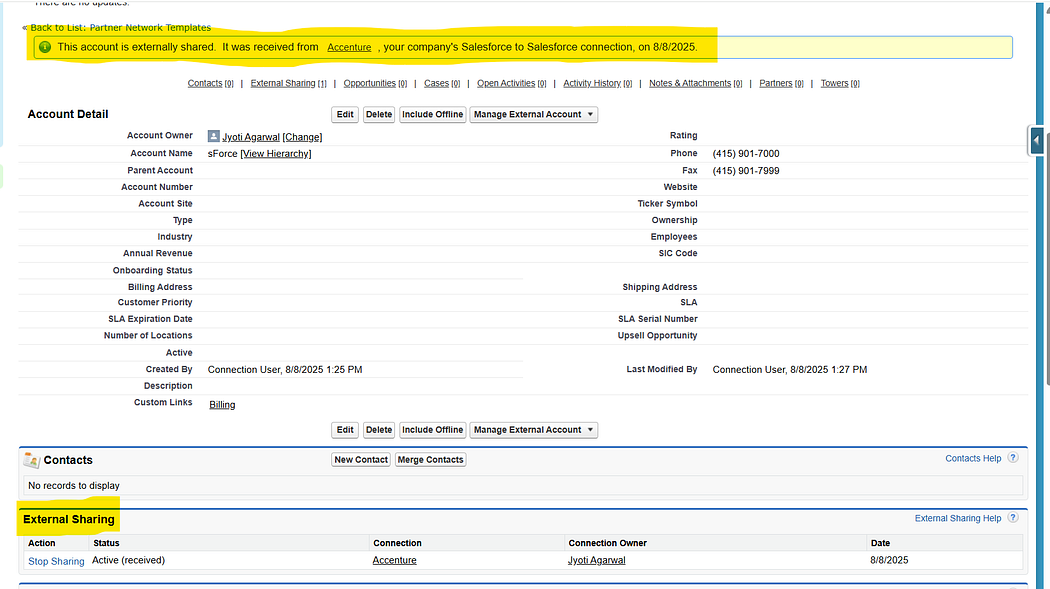
    When two businesses (or even two departments in the same company) use different Salesforce orgs, collaboration can get tricky. Salesforce-to-Salesforce (S2S) provides a native way to share records across orgs — without writing complex integration code. 🚀

    In this article, we’ll explore:

    • How record sharing works in S2S
    • Features and limitations
    • Where S2S can be a quick win (and where it’s not the best fit)

    🔗 How Record Sharing Works

    Think of S2S as a “handshake” between two Salesforce orgs. Once the connection is set up, you can decide what records you want to share (Leads, Contacts, Opportunities, Custom Objects, etc.) and what fields should be visible.

    Here’s the flow in simple terms:

    1. Establish a Connection
    • Admin in Org A sends a connection invite to Org B.
    • Org B accepts → connection is live.
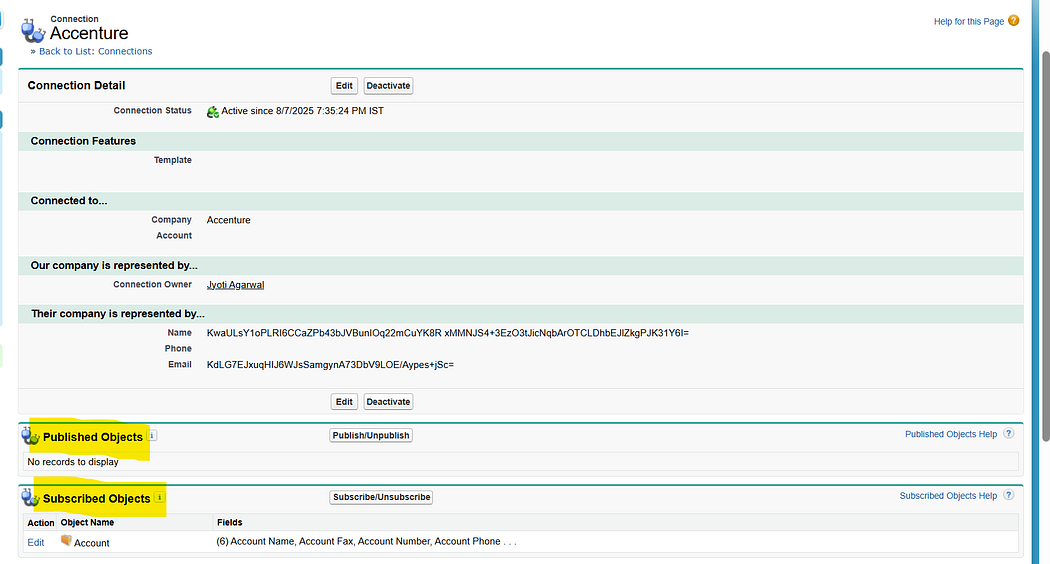
    • Once the connection is established, use the Connections tab to manage partner connections, check status, and start publishing/subscribing objects.

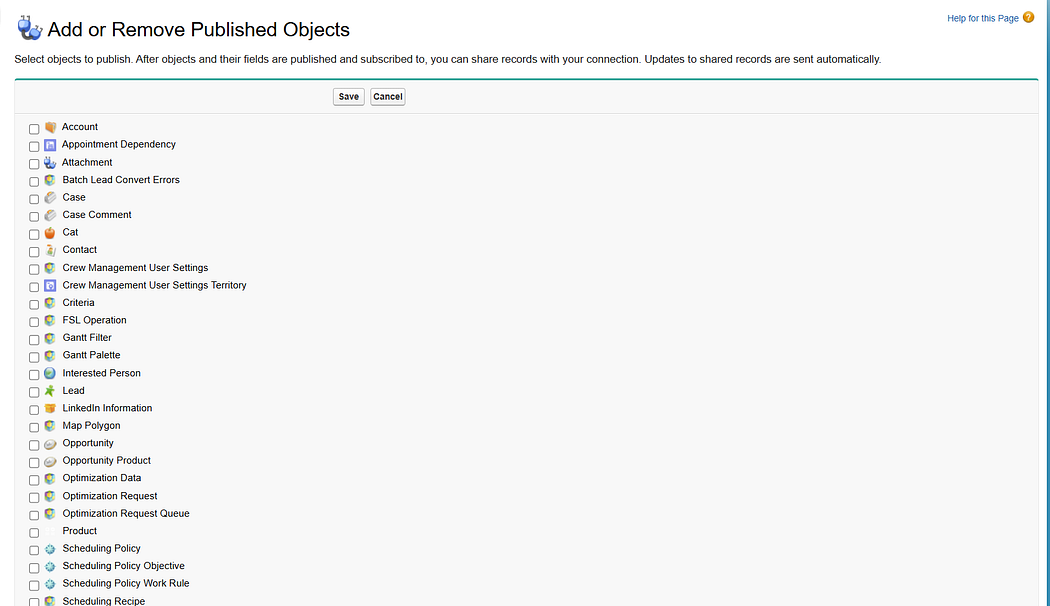
    2. Publish & Subscribe

    • Org A decides which objects/fields to publish.
    • Org B subscribes to those objects and can configure field mapping for the subscribed fields.
    • This determines what data will flow across.

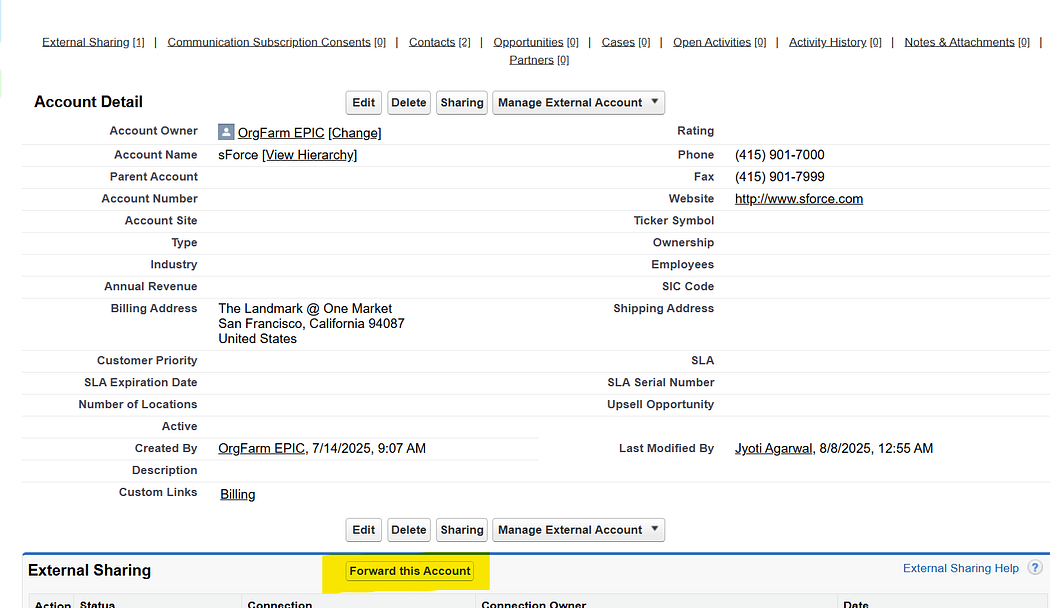
    3. Record Sharing

    • When a record is created/updated in Org A, it must be explicitly shared with Org B.
    • Shared records appear in Org B as native Salesforce records (with new record IDs). Any updates on the published fields in Org A will automatically reflect in Org B

    4. Two-Way Updates (Optional)

    • If both orgs publish and subscribe to the same object, updates can flow both ways.
    • Example: A Lead shared by Org A can later be updated in Org B, and the update syncs back.

    🌟 Features of S2S

    • Native Salesforce Experience → Shared records look and behave like normal Salesforce records.
    • Two-Way Updates → If both orgs publish and subscribe to the same object, updates flow both ways.
    • Field-Level Control → You can decide which fields are visible to the partner org.
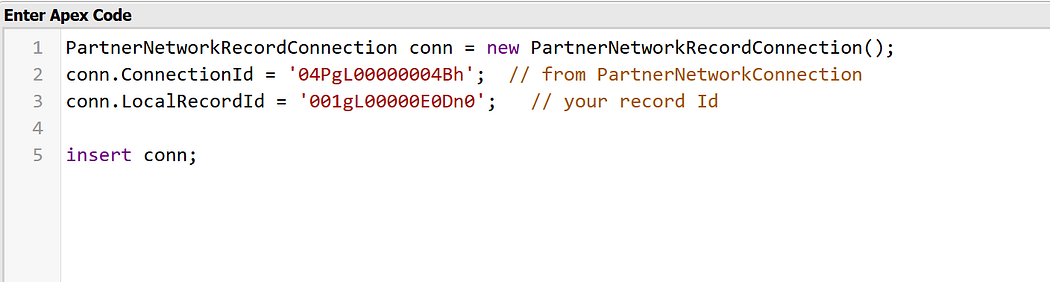
    • Partner Network Records → Partner network records can also be inserted via the Developer Console, giving admins/devs flexibility during testing or special cases.

    ⚠️ Limitations of S2S

    1. No Record Matching→ When a record is shared, the subscriber org always creates a new copy with its own Record ID. S2S does not match against existing records, so every shared record is treated as new.
    2. Explicit Record Sharing Required → Records must be manually forwarded or shared programmatically via Apex; no out-of-the-box auto-sharing filters.
    3. Asynchronous Behavior → Delays may occur before shared records appear in the subscriber org.

    💡 When to Use S2S

    • Quick, low-effort collaboration between two Salesforce orgs.
    • Sharing specific Leads/Contacts/Opportunities with a partner.
    • When both teams want a native Salesforce experience without middleware.

    🚫 When Not to Use S2S

    • Large-scale data migrations.
    • Real-time high-volume integrations.
    • Cases requiring data transformation, deduplication, or complex filtering → APIs, Mulesoft, or custom integrations are better.

    ✨ Final Thoughts

    S2S is like Salesforce’s “plug-and-play” solution for cross-org collaboration. It’s not a full-blown integration platform, but for the right use cases, it’s fast, clean, and easy to set up.

    If you’re considering S2S, start small — share a few records, test the workflows, and decide if it fits your business needs before scaling.

  • 📘 Why Salesforce Is a Game Changer for Small Businesses

    💼 Running a small business is no small feat — from managing leads and customers to tracking sales, marketing, and support, there’s a lot on your plate. That’s where Salesforce comes in. 🚀


    Here’s how Salesforce empowers small businesses:

    1. Stay Organized with CRM 🔍
    Salesforce helps you track every customer interaction — no more juggling spreadsheets or sticky notes.

    2. Automate Routine Tasks
    From sending follow-ups to assigning leads, let Salesforce do the heavy lifting while you focus on growing your business. 🤖

    3. Smart Insights & Reports 📊
    Make informed decisions with dashboards and reports that show what’s working and what’s not. 📈

    4. Access Anytime, Anywhere 📲
    Manage your business on the go with Salesforce’s mobile-friendly platform. 🌍

    5. Scale as You Grow 👫
    Start simple, then add features as your business expands — Salesforce grows with you! 🌱


    💡 Real-Life Use Case:

    Imagine you run a boutique clothing brand. With Salesforce, you can:

    👗 Track customers and their preferences
    💌 Send automated offers
    📦 Manage orders and delivery updates
    📣 Launch targeted marketing campaigns

    All from a single dashboard!


    🧠 Final Thoughts

    Salesforce is not just for big enterprises. It’s an investment in productivity, customer satisfaction, and business growth. 🌟

    Thinking of implementing Salesforce for your business? You’re already on the right track! 💻