Efficient lead management is the backbone of any successful sales process. It ensures that the right prospects are captured, nurtured, and converted into loyal customers. Salesforce provides a full-featured platform to manage the entire lead lifecycle, streamline sales operations, and maintain clean, actionable data.
Here’s a complete guide to the Salesforce lead journey, including tips, steps, and areas where you can take real screenshots.
1️⃣ Understanding the Lead Lifecycle & Sales Funnel
The sales funnel visualizes your leads’ journey — from first contact to becoming a customer. By tracking leads through every stage, sales teams can prioritize efforts and spot bottlenecks.
Key Lead Stages:
- New Lead: Captured but not yet contacted
- Contacted: Initial outreach completed
- Qualified: Ready for conversion
- Converted: Successfully turned into a Contact, Account, and Opportunity
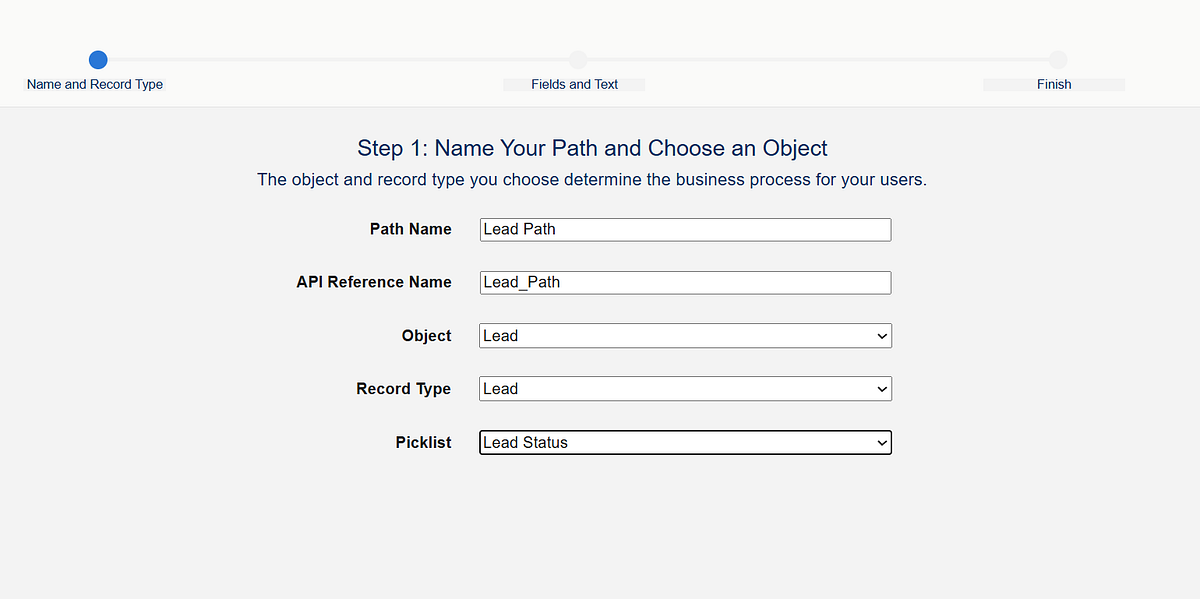
Salesforce Tip: Use Sales Path to visualize lead stages and guide your sales reps.
Setup Steps:
- ⚙️ Navigate to Setup → Path Settings → Leads
- Click New Path, select Lead object, and define stages
- Add guidance for success at each stage (best practices, reminders, or checklist)
- Activate the path ✅

2️⃣ Lead Capture: Gather Prospects Efficiently
Leads come from multiple channels: 🌐 web forms, 📧 emails, 📱 social media, events, or manual entry. Capturing them efficiently ensures no opportunity is lost.
Salesforce Features:
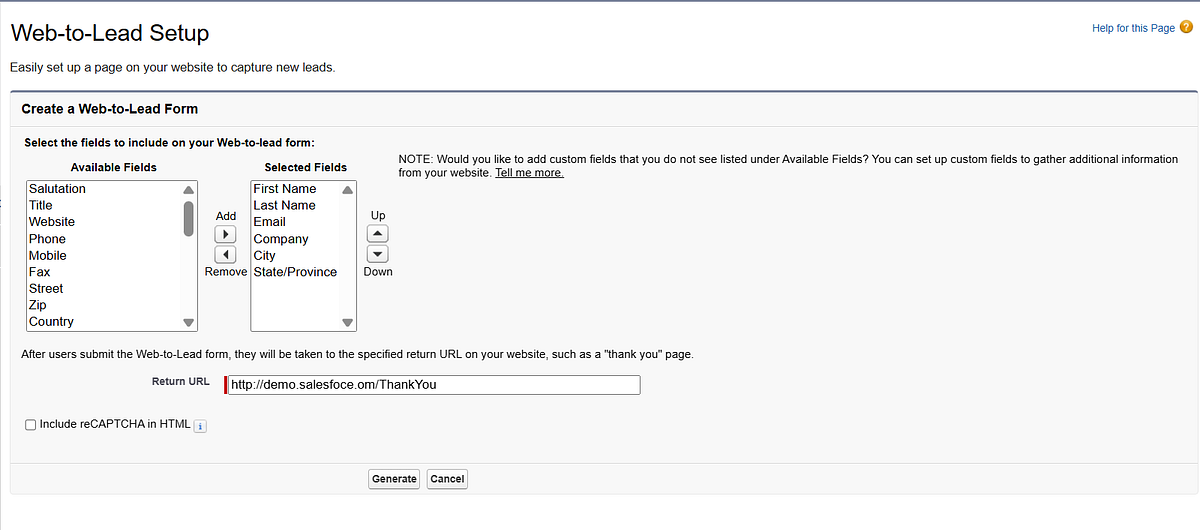
- Web-to-Lead Forms: Automatically funnel inquiries from your website
- Email-to-Lead Integration: Capture leads directly from inbound emails
- Manual Entry: Quickly add prospects through the Lead tab
Setup Steps:
- Go to Setup → Web-to-Lead, configure fields and redirect URL
2. Connect email or marketing platforms for automatic capture
3. Use the Lead tab → New Lead to manually add prospects

3️⃣ Lead Assignment: Route Leads to the Right Rep
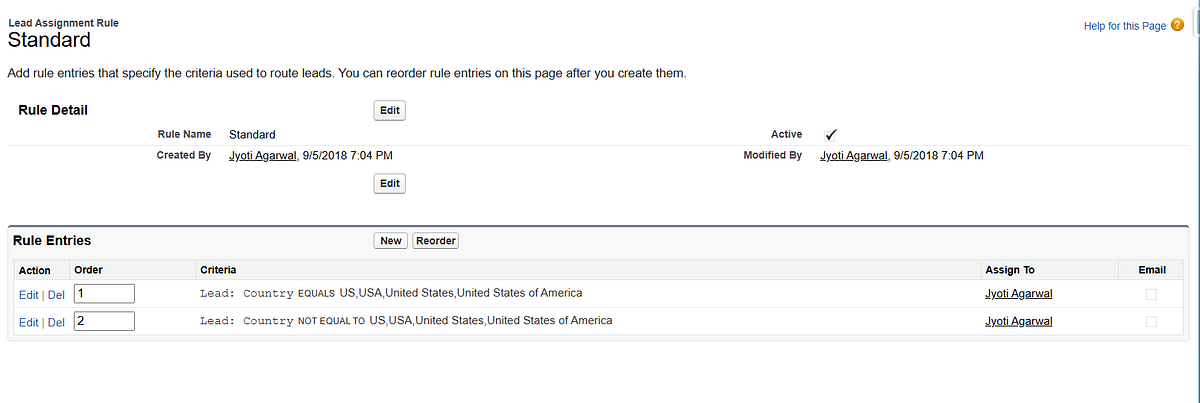
Once captured, leads should go to the right sales rep promptly. Salesforce Assignment Rules automate this, based on territory, product interest, or team structure.
Setup Steps:
- ⚙️ Setup → Lead Assignment Rules → New Rule
- Define criteria (geography, lead source, product interest)
- Activate the rule ✅
Best Practice: Combine assignment rules with queues for teams handling high volumes.
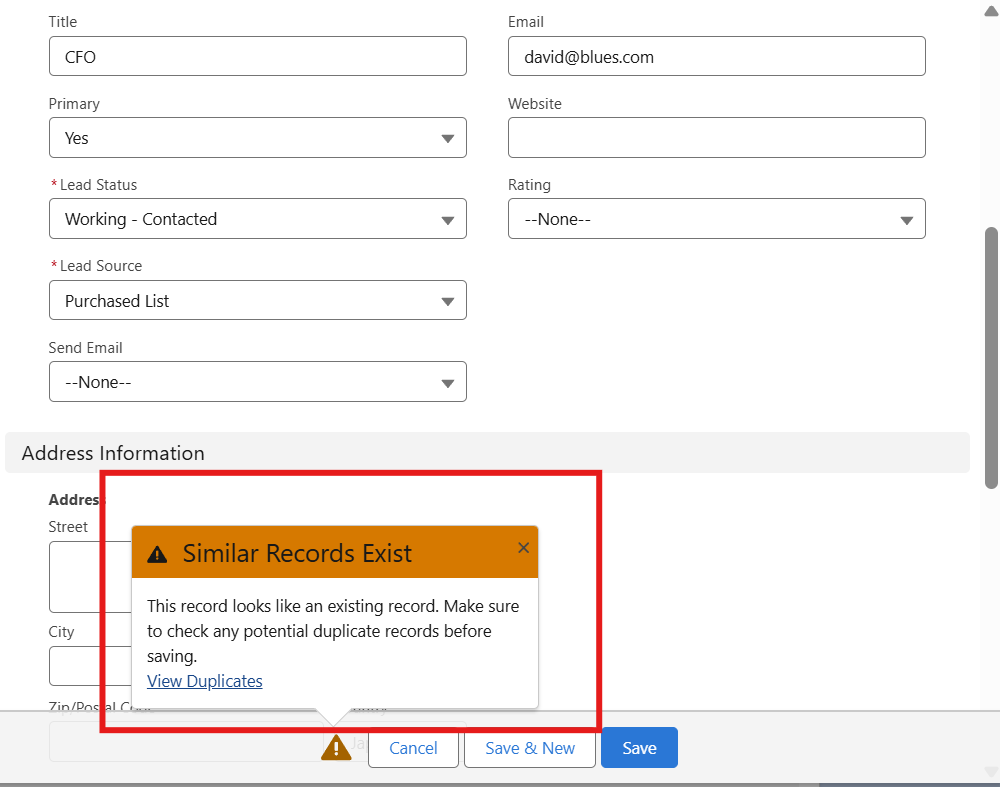
4️⃣ Lead Deduplication: Keep Your Data Clean
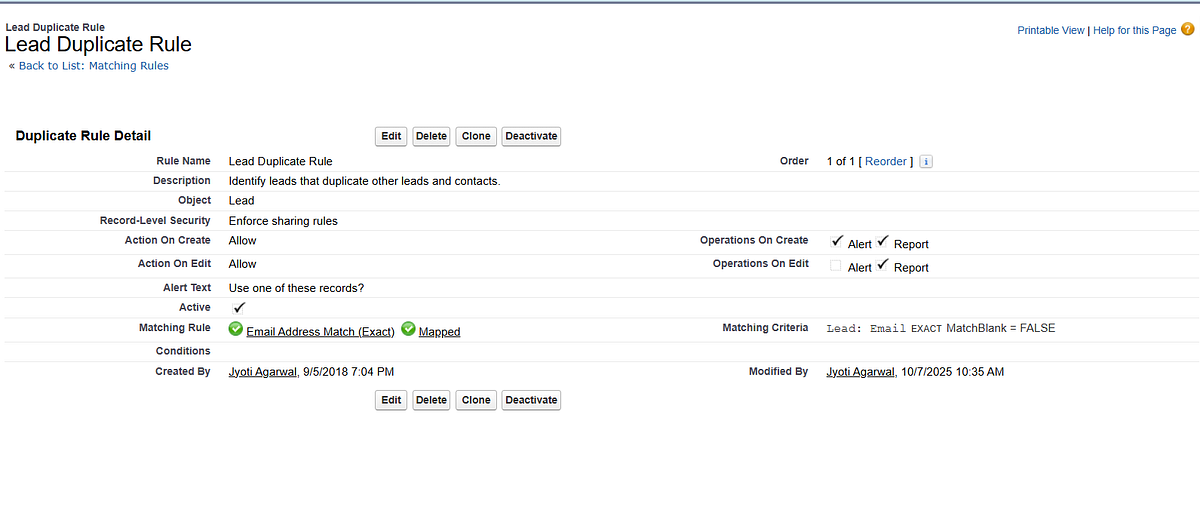
Duplicate leads can waste time and confuse your team. Salesforce provides Matching Rules and Duplicate Rules to prevent duplicates and maintain data integrity.
Setup Steps:
- ⚙️ Setup → Duplicate Rules → Leads → New Rule
- Define matching criteria (Email, Company Name, Phone)
- Choose action: Alert, Block, or Allow with reporting
- Test by creating duplicate leads to verify alerts 🔍
5️⃣ Lead Scoring: Prioritize High-Value Leads
Not all leads are equal. Lead scoring helps sales reps focus on the most promising prospects. Salesforce Einstein or custom formulas can assign points based on:
- Engagement (email opens, clicks, website visits)
- Demographics (company size, location, role)
- Behavioral patterns (product interest, past interactions)
Setup Steps:
- For Einstein Lead Scoring: Setup → Einstein Lead Scoring → Enable
- Or create custom formula fields to score leads based on activity and criteria
- Use list views or reports to filter high-scoring leads for immediate follow-up

6️⃣ Lead Nurturing: Engage Your Prospects
Some leads aren’t ready to convert immediately. Salesforce allows you to nurture leads until they are sales-ready:
- 📝 Tasks & Reminders: Schedule follow-ups with Salesforce Tasks or Flows
- 📧 Automated Emails: Use Email Templates, Pardot, or Marketing Cloud for drip campaigns
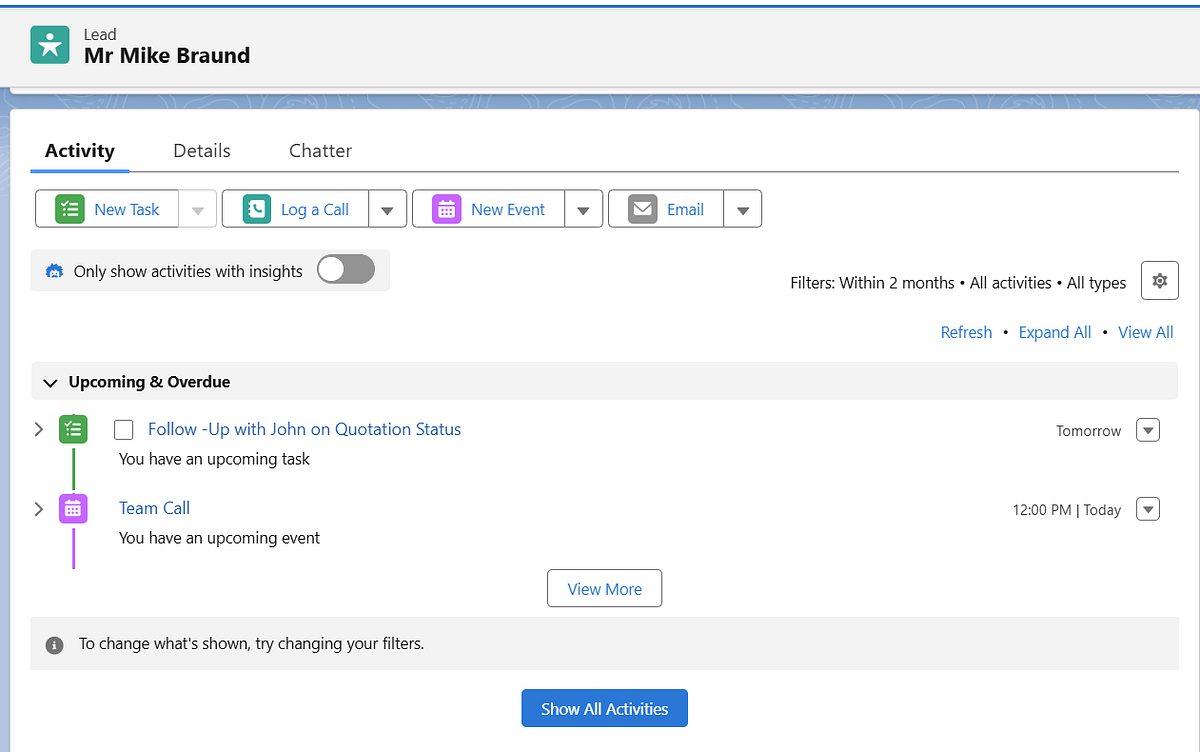
- 🗂️ Activity Tracking: Log calls, emails, and notes to maintain engagement history
Setup Steps:
- Use Process Builder / Flow to automate follow-ups and reminders
- Build Email Templates under Setup → Email → Classic Email Templates
- Track engagement on the lead’s detail page
7️⃣ Lead Conversion: Turn Prospects into Customers
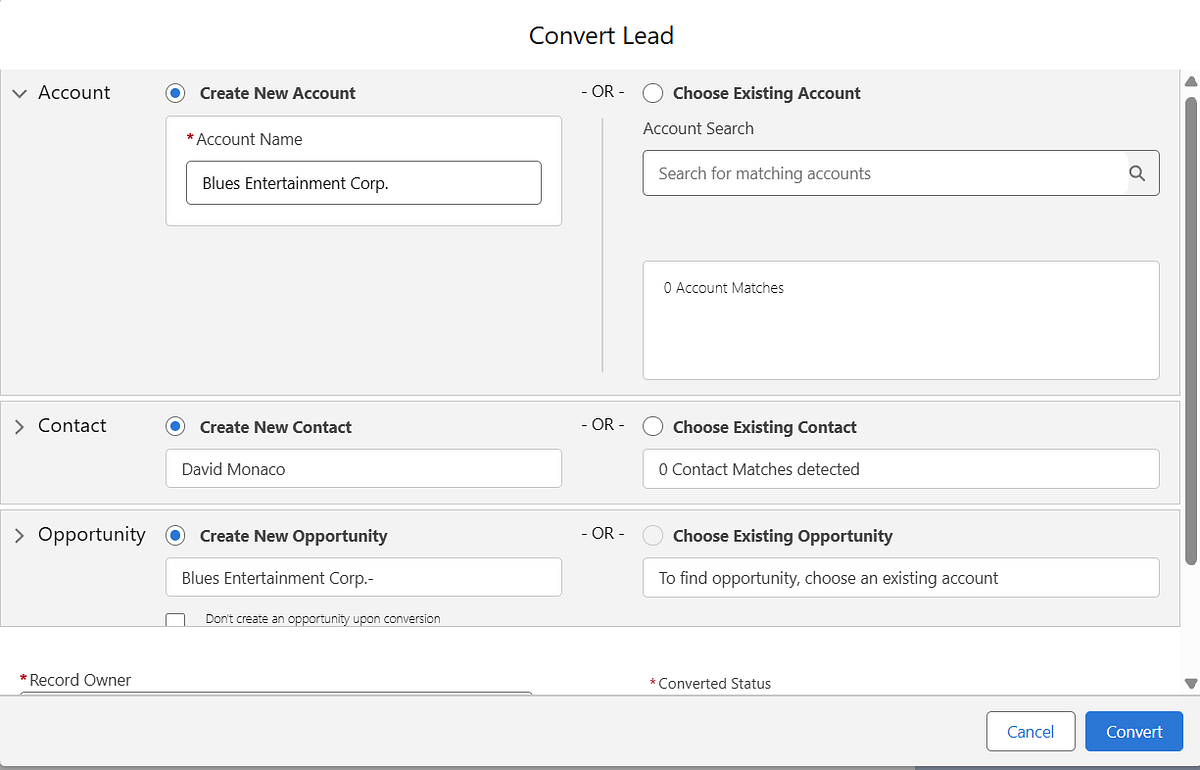
When a lead is ready, convert it to a Contact, Account, and Opportunity. Salesforce ensures this process is seamless and maintains data continuity.
Setup Steps:
- Open the lead record and click Convert 🔄
- Map lead fields to Contact, Account, Opportunity fields
- Optionally, assign Opportunity to a specific owner
8️⃣ Analytics & Reporting: Optimize Lead Performance
Monitoring performance is key to continuous improvement. Salesforce dashboards and reports allow you to track: 📊
- Lead source effectiveness
- Conversion rates
- Response times
- Funnel stage drop-offs
Setup Steps:
- Navigate to Reports → New Report → Leads
- Apply filters and groupings to measure performance
- Build dashboards for visual insights and actionable decisions

9️⃣ Conclusion
Salesforce’s lead management features streamline the entire sales journey — from capturing leads to converting them into loyal customers. By implementing:
- Assignment rules 🏷️
- Deduplication rules 🧹
- Lead scoring ⭐
- Nurturing flows 💌
- Conversion processes 🔄
- Analytics dashboards 📊
your sales team can focus on high-potential leads and maximize conversions.

 Jyoti Agarwal